
Facade Pattern in Business Central - AL Language
Facade Pattern is a Design Pattern to hide complexity of the multiple sub systems by providing a simple interface to the client. This pattern involves a single codeunit which provides simple methods required by the client and delegates call to methods of existing internal codeunits.
Class Diagram
Facade pattern class diagram:
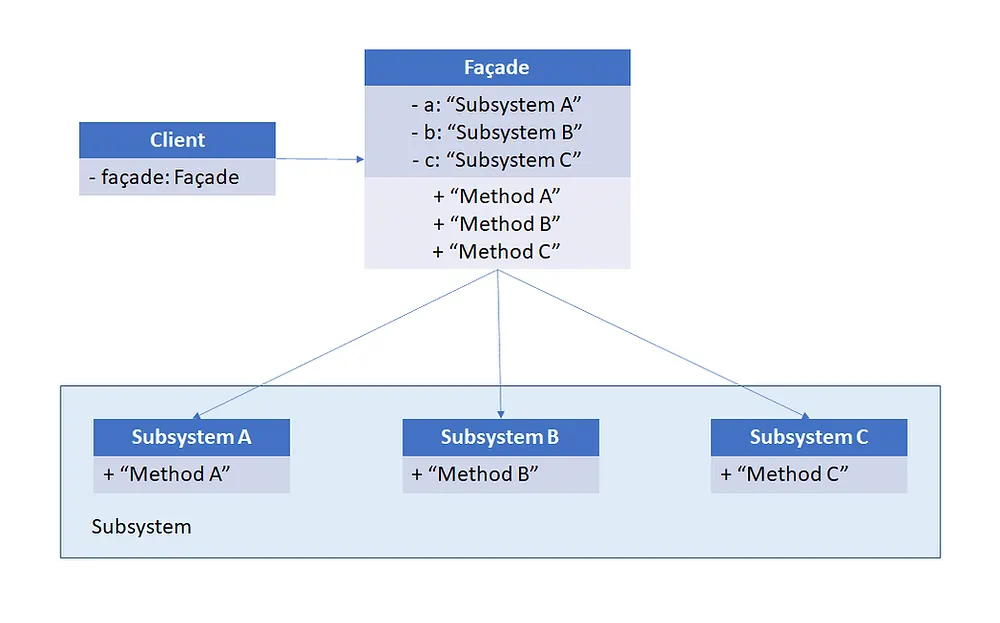
Subsystem: Each class / codeunit in Subsystems has some functionality that will be accessed by client using Facade.
Facade: This will be the interface for client to access complex subsystem.
Client: Client will access the subsystems using Facade
Facade: Sample Scenario
Let's take a simple scenario. Create a facade codeunit which will wrap the functionality to search an item by name, and to search a resource by name in two different codeunits (internal / subsystem).
Subsystem (ItemSearchImpl.Codeunit.al)
This is an internal codeunit. Methods in this codeunit can be accessed only within the current project / module. Internal access will ensure that it is not exposed to the Client.
codeunit 50130 "Item Search Impl"
{
    Access = Internal;

    procedure SearchItems(SearchText: Text[100]; Items: List of [Text[100]])
    var
        Item: Record Item;
    begin
        Item.SetFilter(Description, '@*' + SearchText + '*');
        if Item.FindSet() then
            repeat
                Items.Add(Item.Description);
            until Item.Next() = 0;
    end;
}
Subsystem (ResourceSearchImpl.Codeunit.al)
codeunit 50131 "Resource Search Impl"
{
    Access = Internal;

    procedure SearchResource(SearchText: Text[100]; Resources: List of [Text[100]])
    var
        Resource: Record Resource;
    begin
        Resource.SetFilter(Name, '@*' + SearchText + '*');
        if Resource.FindSet() then
            repeat
                Resources.Add(Resource.Name);
            until Resource.Next() = 0;
    end;
}
Facade codeunit (ItemResourceSearch.Codeunit.al)
This is a Facade codeunit which provides access to the functionalities in "Item Search Impl" and "Resource Search Impl" codeunits to the Client.
codeunit 50132 "Item / Resource Search"
{
    Access = Public;

    procedure SearchItems(SearchText: Text[100]; Items: List of [Text[100]])
    var
        ItemSearchImpl: Codeunit "Item Search Impl";
    begin
        ItemSearchImpl.SearchItems(SearchText, Items);
    end;

    procedure SearchResource(SearchText: Text[100]; Resources: List of [Text[100]])
    var
        ResourceSearchImpl: Codeunit "Resource Search Impl";
    begin
        ResourceSearchImpl.SearchResource(SearchText, Resources);
    end;
}
Module Architecture
Business Central Module Architecture has some special requirements. See Facade codeunit rules.
Conclusion
Using this Design Pattern, we can simplify the APIs of Business Central extension / module / project. The Facade codeunit should not be modified and should only be extended.
Happy Coding!!!
Source Code can be downloaded from GitHub
#MSDyn365 #MSDyn365BC #BusinessCentral #DynamicsNAV #DesignPatterns